
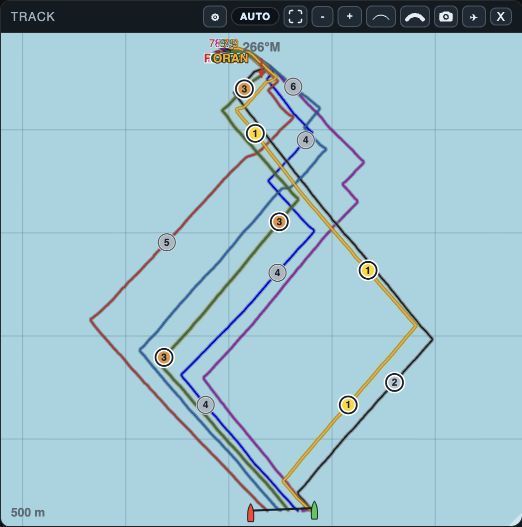
What Track shows
Track shows the GPS path of each open boat in the selected time interval. Start and finish lines, manoeuvre losses, leg ranks and value colours can be drawn over those paths.
Library row selection does not add a boat to Track.
Controls
- Windows: shows or hides Track on web and desktop.
- Top: brings the Track window forward on web and desktop.
- Auto Zoom: fits the selected paths on web and desktop.
- − / +: changes Track scale on web and desktop.
- Auto / Fixed: shows whether automatic framing is active on web and desktop.
- Pinch: zooms Track on native.
- Drag: pans Track on native.
- X: closes the Track window on web and desktop.
Track Options
Track Options on web/desktop and Track settings on native change the display live.
Metric pickers apply a changed value only when confirmed.
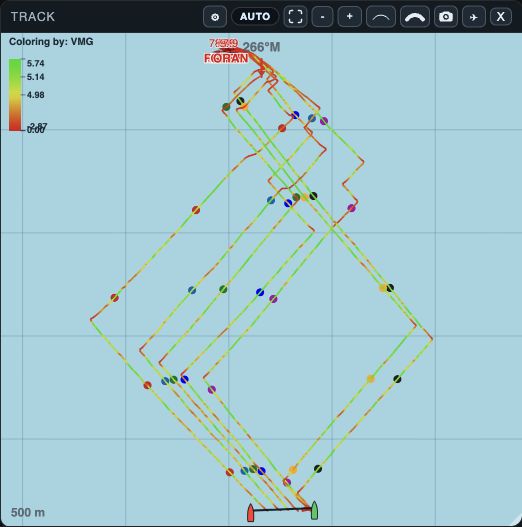
- The scale maps the selected metric from lower values at red to higher values at green.
- Track color follows the selected VMG percentile through the leg.
- Colored dots preserve boat identity while the line color shows metric value.
- Boat shape and COG / Heading: set boat symbol and orientation.
- Team names and value labels: show boat identity and values.
- Distance lines: show distance overlays.
- Maneuver numbers: show manoeuvre labels as Updist or Loss.
- Segment or leg ranks: show rank overlays.
- Percentile-colored tracks: color tracks by the selected metric, palette, scope and ranking direction.
- Line thickness and text size: change drawing weight and label size.
- Map: shows or hides the map.
Context menu (native)
On native, long-press Track to open the course menu.
- Add RC (stbd): saves a starboard committee-boat end.
- Add Pin (port): saves a port pin end.
- Add Finish Port: saves a port finish end.
- Add Finish Starboard: saves a starboard finish end.
- New event: opens an event editor.
- Save: creates the edited event.
- Cancel: discards the event draft.