
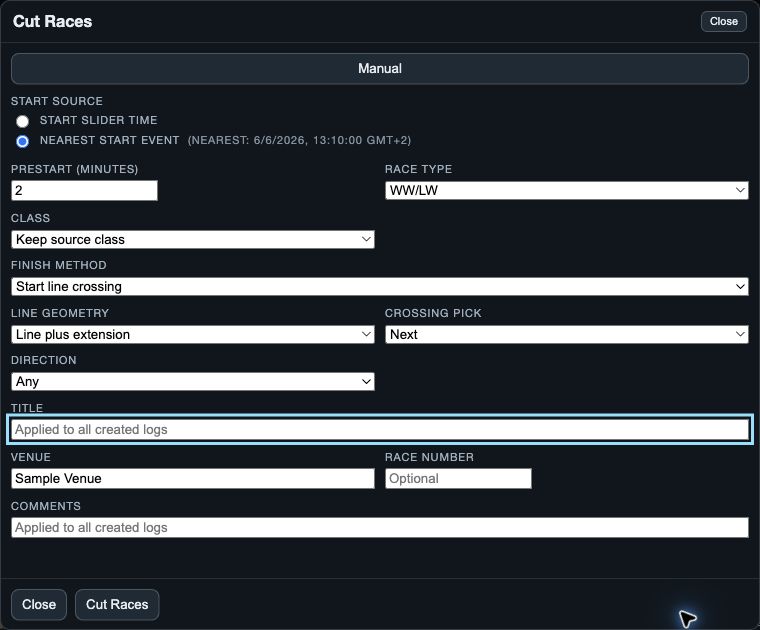
Where to find it and what it affects
Web browser
Open the boats, then choose Cut Races in the Time/Wind controls below the analysis windows.
The dialog may suggest a nearby start event and a finish method. Check each choice rather than accepting it automatically.
Manual cutting uses all open logs.
Start and End are shared references, while each boat can have a different cut end.
Opening or dismissing the cutter does not cut the originals.
Manual controls
| Control | What it does | Effect / saving |
|---|---|---|
| Start source | Start slider time uses Start; Nearest start event uses a matching event within three minutes. | Sets the race start for every new race log. |
| Prestart (minutes) | Sets recording time before the race start. | Extends the cut backward within available coverage. |
| Race type | Sets the displayed race type. | Saves the type with the race details. |
| Class | Keep source class keeps each source class; a named class applies it to new race logs; native uses Sailing class. | Saves class details with new race logs. |
| Finish method | Selects Start line crossing, Finish line crossing, or reference-boat distance matching. | Determines each boat’s cut end; unavailable criteria can error or use a last-sample fallback. |
| Reference boat | Selects the boat used by the distance method. | That boat uses End; other boats use their next distance match. |
| Line geometry | Line between ends only uses the segment; Line plus extension continues beyond both ends. | Sets eligible line crossings. |
| Crossing pick | Selects Nearest, Previous or Next relative to End. | Selects one eligible crossing per boat. |
| Direction | Selects Starting direction (RC right), Opposite or Any on web; native uses shorter labels. | Filters direction independently of Crossing pick. |
| Title | Names the race; native requires a non-empty value. | Saves with the race details. |
| Venue | Sets the location label. | Saves with the race details. |
| Race Number | Sets the race identifier; web can suggest it from Title. | Saves with the race details. |
| Comments | Sets notes for the cut. | Saves with the race details. |
| Cut Races / Create Race Logs | Creates race logs; read created, skipped and failed results. | Original logs remain unchanged. |
| Close / dismiss | Abandons the draft before creation. | Does not create logs and does not undo a completed cut. |
When VKX Auto appears
Eligible Vakaros recordings can show VKX Auto beside Manual.
VKX Auto uses recorded race information and has separate dataset, race-number, prestart and preview controls.
Platform differences to check
- Web may select a nearby start event; native starts with Start slider time.
- Web initially selects Next for line crossings; native initially selects Nearest and may prefer Reference distance.
- Web offers WW/LW and WW/LW Reaching Start; native labels include WW/LW, Reach Start and Other.
- Web disables unavailable finish choices; native can report missing required data after selection.
- Native requires Title; web can derive one from other fields.