
Choose the manoeuvre family
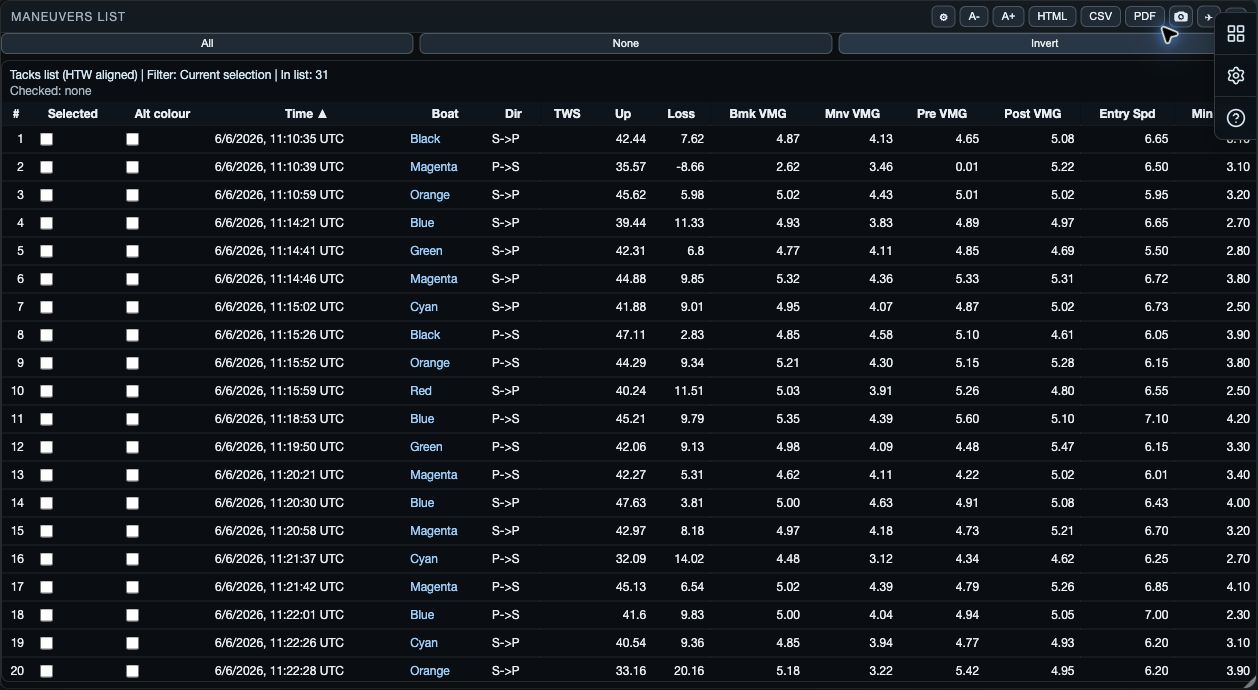
Maneuvers List shows each detected turn in the selected interval, with its boat, time, direction and performance figures. Choose Tacks, Gybes, Round ups, Bear aways or Reach to downwind; check individual events before comparing an overall result.
Detection settings decide which events exist. List settings decide how existing events are presented. Changing a List option does not re-detect manoeuvres.
Switch between detail and overall
Detail shows individual events so you can inspect their time, boat, direction and performance measures. Overall aggregates the available events. Choose Median when an occasional poor event should have less influence, or Average when you want every event to contribute equally.
Select the events you want to compare
Use All, None or Invert to change the current selection. On web and desktop, the row quick menu also offers Select Above, Select Below, Deselect Above, Deselect Below, Select This Log and Deselect This Log.
Selection is a manoeuvre-analysis choice. It does not close a boat, alter its log, or change the shared time selection. Use it to focus the related Maneuver Track and Maneuver Graph views.
Read and share the list
Use Options to choose Detail or Overall and its aggregation. A− and A+ change list text size. The header screenshot action exports an image of the current view; web and desktop also expose HTML.
Native HTML export is not established for this public guide. Native screenshot sharing uses the system share sheet where the view is available.