
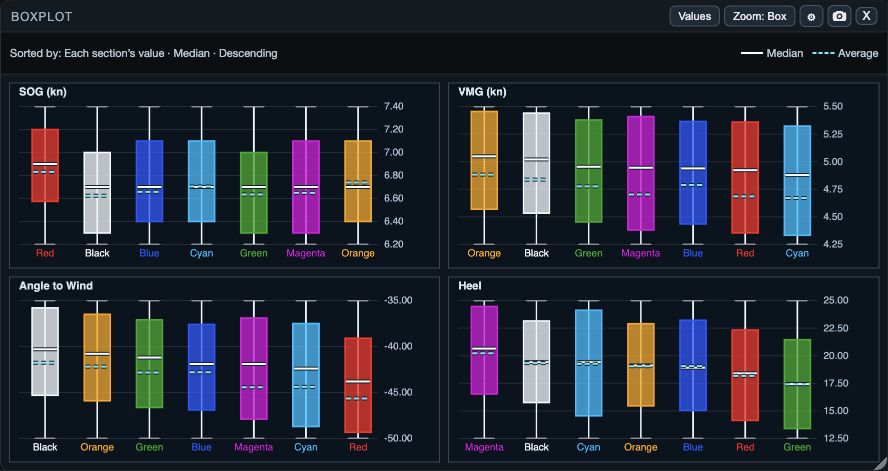
What the chart compares
Boxplot compares the distribution of each selected value across the open fleet. The box contains the central range, whiskers show a wider range, the solid line is the median, and the dashed line is the average. All figures use the selected interval.
1. Read one value at a time
1. Open Boxplot from Windows on web/desktop, or the workspace panels menu or Choose windows on native. 2. Start with a value relevant to the question, such as SOG, VMG, ATW, or Heel. 3. Compare the median and average for each boat. 4. Compare the box and whisker widths. 5. Open Graph or Table when you need to see the individual samples behind a difference.
- A narrow box means the central values are tightly grouped in the selected interval.
- A wide box or whiskers means the values vary more during that interval.
- The median is fixed at the 50th percentile (P50).
- The average can move more than the median when a small number of unusually high or low samples are present.
2. Set the range, layout, and ordering
1. Open Settings. 2. Adjust the box and whisker percentiles only when you need a different view of the spread. 3. Choose Fit to show all boats in a compact card, or Scroll when readable boat columns need more width. 4. Choose Box, Whiskers, or Full to change the vertical scale. 5. Choose the sorting statistic and direction, then check the Sorted by line above the chart.
Zoom changes the vertical scale only; it does not change the selected samples. Each metric section sorts boats using that section’s values, so the order can differ between SOG and VMG.
If the chart is difficult to read
- Too many boats: choose Scroll or narrow the open fleet for a focused comparison.
- Scale hides a difference: switch between Box, Whiskers, and Full, remembering that this only changes the vertical scale.
- A ranking is surprising: read the Sorted by line and compare median with average.
- A value has no useful data: check its availability in Values, then inspect the interval in Graph or Table.
- A settings experiment is misleading: Cancel before OK on web, desktop, or tablet; on phone, use Restore Defaults if you need to undo an applied change.