
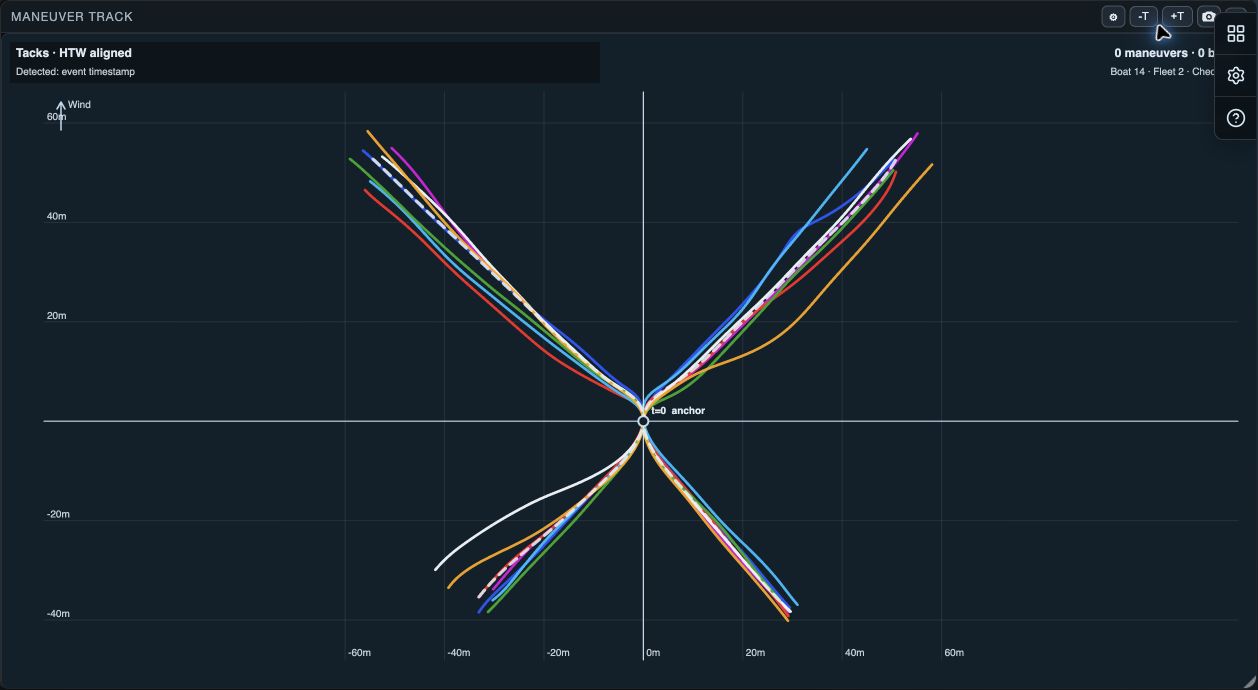
Start with a deliberate event selection
Maneuver Track overlays detected tacks, gybes or roundings, aligned at the turn. Individual paths show variation; a typical path shows the repeatable shape. Use checked rows in Maneuvers List to emphasize or isolate the turns you want to compare.
For example, select three normal tacks from one boat and three from another. Their paths can show whether the gap comes from entry position, the turn itself or recovery after the turn.
Compare individual paths with a typical path
Show thin draws the individual manoeuvre paths. Show typical adds a representative path. In Track Options you can include Per boat, Fleet and Checked rows typical paths, then smooth thin and typical paths independently.
Use thin paths to find outliers. Use a typical path to compare the repeatable shape. Turning thin paths off can make a group easier to read, but it can also hide the spread that explains an average result.
Focus the comparison
- Boats limits the view to All open boats or one boat.
- Checked Rows chooses Emphasize selected or Show selected only.
- Mirror to same side aligns port and starboard tacks or gybes for shape comparison. It is useful for side-change types; do not use it to infer course geometry.
- −T and +T change line thickness for readability.
Export the comparison
Export Maneuver Track screenshot creates a visual export. Native shares the image through the system share sheet. The export is a snapshot of the current presentation, so record the event type, checked rows and smoothing when using it in a debrief.