
Choose the right editing scope
Library editing changes stored metadata for selected Library records. Edit Open Logs on web/desktop works on every log currently open for analysis. First decide which set you intend to change.
- Use Library when you are correcting titles, team names, boat numbers, event, class, venue and other stored record details.
- Use Edit Open Logs only when every open log should receive the same applicable change or repair.
- Close unrelated boats before using a repair that applies across the open fleet.
1. Edit stored Library metadata
In Library, enter Manage or open a record’s actions, choose Edit, then select the fields you mean to change. Native Library editing supports Title, Team, Boat number, Event, Class, Venue, Race number, Race type, Time zone, GPS offset from bow and Comments.
Review the selected count before saving. On native, Save applies only enabled fields; Cancel leaves the stored metadata unchanged. The original filename stays unchanged even when the title changes.
2. Edit open logs on web or desktop
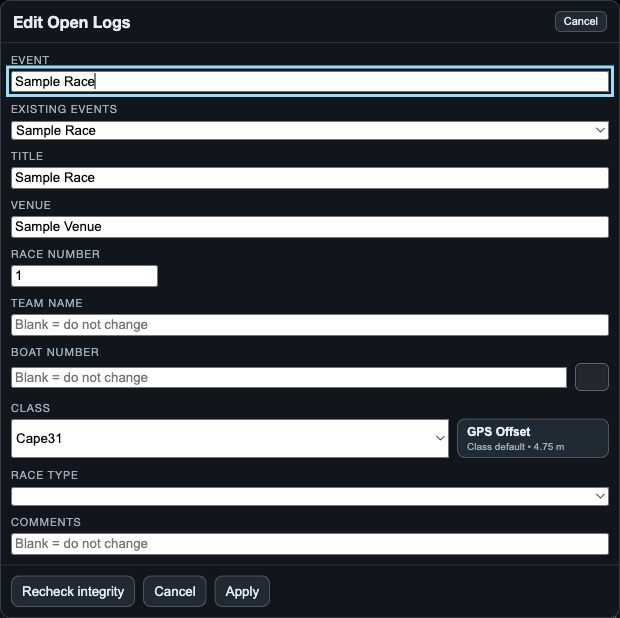
Open Edit Open Logs, then fill only the fields you want to change. The dialog includes Event or Existing Events, Title, Venue, Race Number, Team Name, Boat Number, Class, Race Type, GPS Offset, Comments and Time Offset.
Choose Apply to commit the requested changes or Cancel to dismiss the dialog. A Time Offset entered here applies to all open logs. It accepts seconds, a decimal value, or a minutes/seconds or hours/minutes/seconds form.
3. Run repair actions one at a time
The web/desktop dialog also offers Recheck integrity, Fix SOG, Fix COG, Fix Time Zones and Cleanup Locations. Read the result after each action before starting another repair.
Cleanup Locations uses the chosen maximum distance from the log’s median centre. Use it only when you understand which outlying positions should be removed; it is not a general way to improve a weak GPS track.