
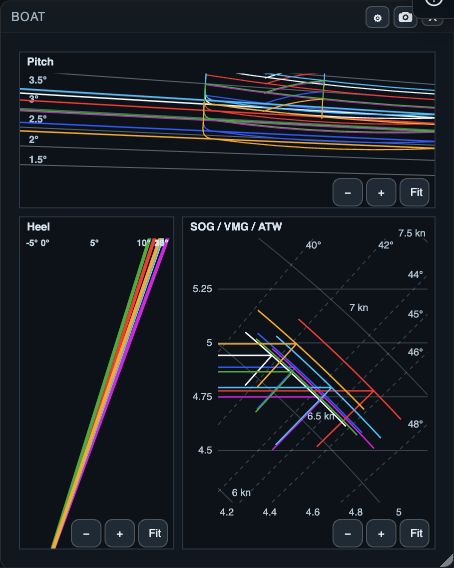
What Boat compares
Boat shows Pitch, Heel and SOG / VMG / ATW for each open boat in the selected interval. The traces show boat attitude and speed together, making differences between boats easy to see on the same leg.
1. Compare the same sailing period
1. Open the boats you want to compare. 2. In Time & Wind, bracket a clean section of the same leg. 3. Open Boat from Windows on web/desktop, or the workspace panels menu or Choose windows on native. 4. Read Pitch and Heel together, then compare the SOG / VMG / ATW panel. 5. Check Track or Graph when a boat is missing or looks unlike the fleet.
- Pitch is the boat’s fore-and-aft attitude in the displayed interval.
- Heel is the side-to-side attitude in the displayed interval.
- SOG is speed over ground; VMG is wind-relative and depends on the wind setup.
- ATW is shown with SOG and VMG in the speed panel; it is context for the displayed comparison rather than a standalone verdict.
2. Use the heel filter carefully
1. Open Boat settings or Options. 2. Set Min heel and Max heel. 3. Re-read the Heel panel with the selected range in mind. 4. Restore a wider range before making a fleet-wide conclusion.
The heel filter hides boats whose average heel is outside the chosen range in the heel panel. It is a display filter for that panel; it does not edit the log, change the common time selection, or remove samples from other views.
If Boat does not answer the question
- No data: confirm that the boat is open and that the time range contains pitch, heel, speed, or VMG samples.
- A boat disappears only from Heel: widen Min heel and Max heel.
- VMG looks misleading: recheck wind direction and bearing reference in Time & Wind.
- Boats are on different maneuvers or legs: narrow the range or select the same leg, then compare again.
- You need the history behind a value: use Graph or Table alongside Boat.